Thursday, August 21, 2025

Yaml Data vs Json Data

YAML and JSON are both data serialization formats used for data exchange and configuration, but they differ in their syntax and readability.

JSON Example Data:

{
  "person": {
    "name": "Alice",
    "age": 30,
    "isStudent": false,
    "hobbies": ["reading", "hiking", "cooking"],
    "address": {
      "street": "123 Main St",
      "city": "Anytown"
    }
  }
}

YAML Example Data:

person:

          # This is comment from YAML which JSON format  doesn't support

name: Alice
  age: 30
  isStudent: false
  hobbies:
    - reading
    - hiking
    - cooking
  address:
    street: 123 Main St
    city: Anytown

Key Differences Illustrated:

  • Syntax:

JSON uses curly braces {} for objects and square brackets [] for arrays, with key-value pairs separated by colons : and elements separated by commas ,. YAML uses indentation to define structure, with key-value pairs separated by colons : and list items denoted by hyphens -.

  • Readability:

YAML is often considered more human-readable due to its minimal use of structural characters and reliance on indentation. JSON's strict syntax with braces and commas can be less intuitive for direct human  editing.  YAML is better for human-maintained files.

  • Comments:

YAML supports comments using the hash symbol #, allowing for explanations within the file. JSON does not natively support comments. It  is  a  big disadvantage.

  • Quoting:

In YAML, strings often do not require quotes unless they contain special characters or could be misinterpreted as other data types. In JSON, string values must always be enclosed in double quotes "".

Beacause of YAML uses space indentation, which is familiar for Python developers. JavaScript developers love JSON because it is a subset of JavaScript and can be directly interpreted and written inside JavaScript.

If the data format will be leaving an application's environment, parsed within a UI, or sent in a messaging layer, JSON might be a better choice. YAML can be used, directly, for complex tasks like grammar definitions

Very  important  and  interesting more   information  can  be get  through  this  stackoverflow  comments .

 References Used are What is the difference between YAML and JSON?  and  through AI Overview.

API documentation tool for developers

As a   developers  we  have  to  create  documentations  for  our  API . In  the industry several automated API documentation tools are available for developers, each with distinct features and strengths. The "best" tool depends on specific needs and workflows.

Top Automated API Documentation Tools:

Postman:

A comprehensive platform offering API development, testing, and automated documentation generation from API collections. It emphasizes collaboration and supports various protocols like REST, GraphQL, WebSocket, and SOAP.

SwaggerHub/Swagger UI:

Part of the OpenAPI ecosystem, SwaggerHub provides API lifecycle management with a focus on standardization and scalability, while Swagger UI generates interactive documentation directly from OpenAPI specifications. Abstraction of API description facilitating adoption of innovations in API behaviors 
while avoiding total rewrites. For more information about OpenApi  vs Swagger click here.

Stoplight:

An all-in-one platform for API design, development, and documentation, emphasizing visual tools, style guides, and quality control. It supports interactive features for testing APIs.  To watch demo  click  here .  As per  my  study this  one  hasn't  free version.

Redocly:

Specializes in creating visually appealing and interactive API documentation from OpenAPI specifications. It offers strong customization options and supports developer portals.

ReadMe:

Designed for building interactive developer hubs and improving API usage. It includes features like user feedback, discussion forums, and analytics for data-driven improvements. 

APItoolkit:

Simplifies the documentation process by automatically creating OpenAPI documentation (Swagger docs) from real-time production traffic. 

Insomnia:

A modern API client that also offers automated documentation generation, particularly strong for GraphQL support and a streamlined workflow.

Considerations for Choosing a Tool:

API Specification:

Compatibility with OpenAPI (Swagger) is a common and beneficial feature for many tools.

Automation Level:

Some tools offer more extensive automation, such as generating documentation directly from code or production traffic.

Collaboration Features:

For team environments, tools with strong collaboration features are essential.

Customization and Branding:

The ability to customize the look and feel of the documentation to match branding.

Developer Experience:

Features that enhance the developer experience, such as interactive explorers, guides, and tutorials.

Pricing and Hosting:

Consider whether a free/open-source option, a cloud-hosted solution, or a self-hosted option aligns with budget and infrastructure requirements. This factor also we  have   to consider  in most  cases.

References  from :-  AI Overview and other  products relevant sites.


Thursday, June 16, 2022

cloc – Count Lines of Code in Many Programming Languages


While working on different projects, sometimes you might be required to provide a report or statistics of your progress, or simply to calculate the value of your code.

There is this simple yet powerful tool called “cloc – count lines of code” that allows you to count all number of your code and exclude comments and blank lines at the same time.

It is available in all major Linux distributions and supports multiple programming languages and file extensions and does not have any specific requirements to be used.

In this tutorial you are going to learn how to install and use cloc on your Linux system.


Use this  link  to  complete  article    :-  https://www.tecmint.com/cloc-count-lines-of-code-in-linux/

Wednesday, January 12, 2022

Using Special Characters in Strings in Java

When a string is being created or displayed, its text must be enclosed within double quotation marks to indicate the beginning and end of the string. These quotation marks are not displayed, which brings up a good question: What if you want to display double quotation marks?

To display them, Java has created a special code that can be put into a string: \". Whenever this code is encountered in a string, it is replaced with a double quotation mark. For example, examine the following:

System.out.println("Jane Campion directed \"The Piano\" in 1993.");

This code is displayed as the following:

Jane Campion directed "The Piano" in 1993.

You can insert several special characters into a string in this manner. The following list shows these special characters; note that each is preceded by a backslash (\).

Special characters

Display

\'

Single quotation mark

\"

Double quotation mark

\\

Backslash

\t

Tab

\b

Backspace

\r

Carriage return

\f

Formfeed

\n

Newline


The newline character causes the text following the newline character to be displayed at the beginning of the next line. Look at this example:

System.out.println("Music by\nMichael Nyman");

This statement would be displayed as the following:

Music by
Michael Nyman
 
Reference :-  https://www.informit.com/articles/article.aspx?p=30241&seqNum=3 

Thursday, December 23, 2021

Spring Boot File Download Example

 From  below  documentations  have  good  articles  about   file  download .


  • https://javadeveloperzone.com/spring-boot/spring-boot-download-file-example/


  • Basically there is no need to add produces = "application/pdf" in RequestMapping as it seems to try to convert the ResponeBody internally. You can just add MediaType to response headers which is what you need.
@ResponseBody
@RequestMapping(value = "get/pdf/{id}", headers="Accept=*/*", method = RequestMethod.GET)
public ResponseEntity<InputStreamResource> getPdfContractById(@PathVariable("id") Long id){
        // Get the remove file based on the fileaddress
        RemoteFile remotefile = new RemoteFile(id);

        // Set the input stream
        InputStream inputstream = remotefile.getInputStream();
        // asume that it was a PDF file
        HttpHeaders responseHeaders = new HttpHeaders();
        InputStreamResource inputStreamResource = new InputStreamResource(inputStream);
        responseHeaders.setContentLength(contentLengthOfStream);
        responseHeaders.setContentType(MediaType.valueOf("application/pdf"));
        // just in case you need to support browsers
        responseHeaders.put("Content-Disposition", Collections.singletonList("attachment; filename=somefile.pdf"))
        return new ResponseEntity<InputStreamResource> (inputStreamResource,
                                   responseHeaders,
                                   HttpStatus.OK);
}
Reference :- https://stackoverflow.com/a/33877513/5802185 

Thursday, December 16, 2021

Can I Email… Useful tool when creating email templates

 While I’m 85% certain you’ve seen and used Can I Use…, I bet there is only a 13% chance that you’ve seen and used Can I Email…. It’s the same vibe—detailed support information for web platform features—except instead of support information for web browsers, it is email clients. Campaign Monitor has maintained a guide for a long time as well, but I admit I like the design style pioneered by Can I Use….


References Used :-  https://css-tricks.com/can-i-email/


Monday, October 11, 2021

Model Tree Structures in Mongo DB

Hope this  document will  help  to model   hierarchical or nested data relationships with mongoDB .

MongoDB allows various ways to use tree data structures to model large hierarchical or nested data relationships.

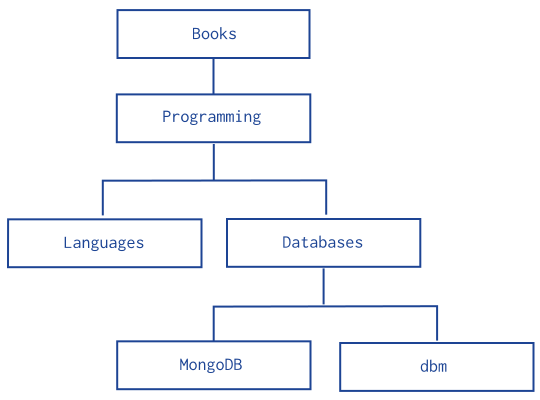
Tree data model for a sample hierarchy of categories.
Model Tree Structures with Parent References
Presents a data model that organizes documents in a tree-like structure by storing references to "parent" nodes in "child" nodes.
Model Tree Structures with Child References
Presents a data model that organizes documents in a tree-like structure by storing references to "child" nodes in "parent" nodes.
Model Tree Structures with an Array of Ancestors
Presents a data model that organizes documents in a tree-like structure by storing references to "parent" nodes and an array that stores all ancestors.
Model Tree Structures with Materialized Paths
Presents a data model that organizes documents in a tree-like structure by storing full relationship paths between documents. In addition to the tree node, each document stores the _id of the nodes ancestors or path as a string.
Model Tree Structures with Nested Sets
Presents a data model that organizes documents in a tree-like structure using the Nested Sets pattern. This optimizes discovering subtrees at the expense of tree mutability.
 
Reference  Used :-   https://docs.mongodb.com/manual/applications/data-models-tree-structures/
 

Some interesting things to explore more

 Here  some  some  things  to  study  more ,     How Google Search works               https://developers.google.com/search/docs/fundamental...