1.Oracle has a data type TIMESTAMP,
which can also represent a date (with time). If you subtract TIMESTAMP values, you get an INTERVAL .
To extract numeric values ,use the EXTRACT function.
select
extract( day from diff ) Days,
extract( hour from diff ) Hours,
extract( minute from diff ) Minutes ,
( extract( day from diff ) 24*60*60*60 + extract( hour from diff )60*60*60 +
extract( minute from diff )*60*60 ) TotalMiliSecResult
from (
select ( CAST( action_time as timestamp) - CAST( idle_time as timestamp) ) diff
from mwt_idle_wallet
);
Version :- 1.0.0
Showing posts with label SQL. Show all posts
Showing posts with label SQL. Show all posts
Saturday, July 20, 2019

Monday, November 26, 2018
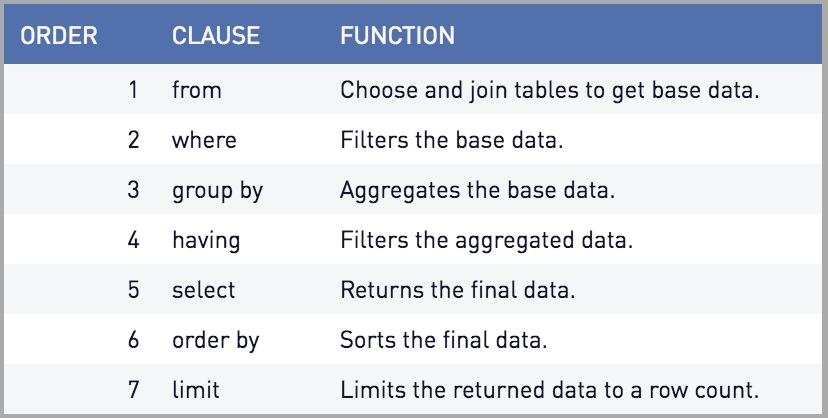
SQL Query Order of Execution
1.
2.
3.
4.
5.
6.
7.
8.
FROM and JOINs2.
WHERE3.
GROUP BY4.
HAVING5.
SELECT6.
DISTINCT7.
ORDER BY8.
LIMIT / OFFSET
The
FROM clause, and subsequent JOINs are first executed to determine the total working set of data that is being queried. This includes subqueries in this clause, and can cause temporary tables to be created under the hood containing all the columns and rows of the tables being joined.
Once we have the total working set of data, the first-pass
WHERE constraints are applied to the individual rows, and rows that do not satisfy the constraint are discarded. Each of the constraints can only access columns directly from the tables requested in the FROM clause. Aliases in the SELECT part of the query are not accessible in most databases since they may include expressions dependent on parts of the query that have not yet executed.
The remaining rows after the
WHERE constraints are applied are then grouped based on common values in the column specified in the GROUP BY clause. As a result of the grouping, there will only be as many rows as there are unique values in that column. Implicitly, this means that you should only need to use this when you have aggregate functions in your query.
If the query has a
GROUP BY clause, then the constraints in the HAVING clause are then applied to the grouped rows, discard the grouped rows that don't satisfy the constraint. Like the WHERE clause, aliases are also not accessible from this step in most databases.
Any expressions in the
SELECT part of the query are finally computed.
Of the remaining rows, rows with duplicate values in the column marked as
DISTINCT will be discarded.
If an order is specified by the
ORDER BY clause, the rows are then sorted by the specified data in either ascending or descending order. Since all the expressions in the SELECT part of the query have been computed, you can reference aliases in this clause.
Finally, the rows that fall outside the range specified by the
LIMIT and OFFSET are discarded, leaving the final set of rows to be returned from the query.References Used :- sql-query-order-of-operations
select_queries_order_of_execution
Friday, September 29, 2017
SQL JOINS

- Using those new standard and earlier standard will execute in same way(Speed etc) , but this new standard is more useful , powerful .
Monday, April 24, 2017
Views - SQL
Benifits of Views
A view provides several benefits.
1. Views can hide complexity
If you have a query that requires joining several tables, or has complex logic or calculations,
you can code all that logic into a view, then select from the view just like you would a table.
2. Views can be used as a security mechanism
A view can select certain columns and/or rows from a table, and permissions set on the view
instead of the underlying tables. This allows surfacing only the data that a user needs to see.
3. Views can simplify supporting legacy code
If you need to refactor a table that would break a lot of code, you can replace the table
with a view of the same name. The view provides the exact same schema as the original table,
while the actual schema has changed. This keeps the legacy code that references the table
from breaking, allowing you to change the legacy code at your leisure.
4.Among other things, it can be used for security. If you have a "customer" table, you might
want to give all of your sales people access to the name, address, zipcode, etc. fields, but
not credit_card_number. You can create a view that only includes the columns they need access
to and then grant them access on the view.
5.A view is an encapsulation of a query. Queries that are turned into views tend to be complicated
and as such saving them as a view for reuse can be advantageous. Though a view doesn't store data, some refer to a views as “virtual tables,” you can query a view like you can a table .
6.Once a view is created you can used then as you would any table in a SELECT statement.
7.Views take up very little space, as the data is stored once in the source table.
Sample view is shown below .
CREATE OR REPLACE VIEW SAMPLE_VIEW AS
SELECT cast('A' as varchar2(2)) col1,'Overdue period > 0 month and < 3 months' col2
FROM dual
UNION
SELECT cast('B' as varchar2(2)) col1,'Overdue period > 3 month and < 6 months' col2
FROM dual
UNION
SELECT cast('C' as varchar2(2)) col1,'Overdue period >= 24 months' col2
FROM dual
UNION
SELECT cast('D' as varchar2(2)) col1, 'Overdue RV > 0' col2
FROM dual
Subscribe to:
Posts (Atom)
-
 "Injection attacks": Common Types of Injection Attacks : There are several types of injection attacks, including SQL injection,...
 -
With Java 25 , One interesting changes can view is JEP 512, "Compact Source Files and Instance Main Methods," significa...
-
 The AI-Driven Software Developer: Optimize, Innovate, Transform": AI Transformation in Software Development : Understand how AI is re...